
DC motor experiment: speed, current and back-EMF
- Objective
- Find out how a DC motor works in a simulator: measure how its speed and current change with the supply voltage and with the load, see what reversing the battery does, and explain why a stalled motor draws so much current.
- Level
- High school and first-year college
- Time
- 45 minutes
- Topics
- DC motors, back-EMF, speed and voltage, torque and current, stall current, power (P = I²R), fuses
Steps
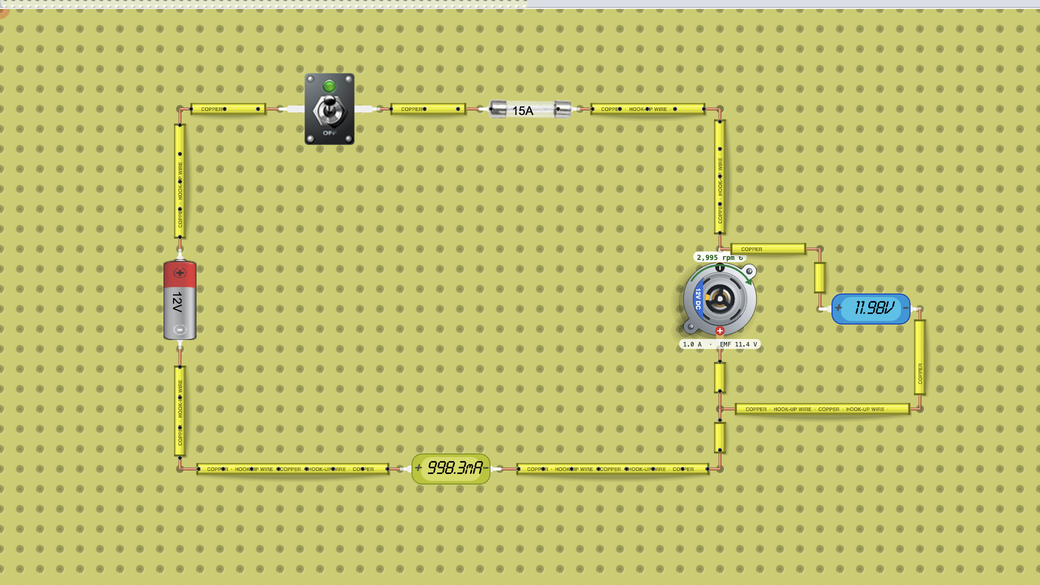
- Look at the circuit: a 12 V battery, a switch, a 15 A fuse and a DC motor in series, an A meter (ammeter) on the return wire and a V meter (voltmeter) across the motor. The motor uses the Generic preset: rated for 12 V, 3000 rpm with no load, and 20 A with the rotor held still (the stall current). Its Load (%) is 0.
- Run the circuit on this page or press Open in the lab. The copy on this page pauses after two minutes; to keep going, sign in and press Open in the lab. The motor spins up in a fraction of a second. Fill in the first row of the table: the speed on the label above the motor, the current and the back-EMF (EMF) on the label below it, the V meter reading, and the A meter reading, which matches the motor's current.
- Click the battery and change its Voltage to 9 V, then 6 V, then 3 V. Wait for the speed to settle and record a row each time. After a change the A meter can keep showing an averaged value marked RMS, so from here on read the current on the motor's label. Set the battery back to 12 V.
- Reverse the battery: click the switch to open it and wait until the motor stops (about 10 seconds), click the battery and press F (Flip), then close the switch. Record the speed, the direction of the arrow and the signs of the readings. Flip the battery back the same way.
- Click the motor and set Load (%) to 25, then to 50. Record the speed and the current each time, then set Load (%) back to 0. Stop at 50 %: question 5 asks you to predict 75 %.
- Set the battery to 6 V, click the motor and tick Locked rotor. The label above the motor shows STALL and the current. Record the readings and watch for 30 seconds. The simulator tracks the winding's heat, and the motor's can glows red only as it nears its burn limit; at 6 V it stays well below that limit, so there is little or no glow and the motor never burns. Untick Locked rotor.
- Fuse demo, once, and only watch it: set the battery to 12 V and tick Locked rotor. Read the current on the motor's label right away: the fuse blows within a few seconds and the motor stops. Reload the page to get the original circuit back.
Data table
| Setting (battery V, Load %, locked) | V meter (V) | Speed (rpm) and arrow | Current on the motor's label (A) | Back-EMF (V) | What you saw |
|---|---|---|---|---|---|
Questions
- How does the no-load speed depend on the battery voltage? Work out the speed per volt for each row.
- At 12 V the motor's winding resistance is only R = 12 V ÷ 20 A = 0.6 Ω, yet the current is about 1 A, not 12 V ÷ 0.6 Ω = 20 A. Use V = I × R + back-EMF to explain your 12 V readings.
- What changed when you reversed the battery, and what stayed the same? Why do you stop the motor before reversing it?
- Why does the speed fall and the current rise when you add load?
- Predict the current and the speed at Load (%) 75 with 12 V. What will the 15 A fuse do? If your teacher agrees, try it, then reload the page.
- With the rotor locked, what current did you read at 6 V and at 12 V? How much power turns into heat in the winding in each case, and why does the fuse matter at 12 V?
For teachers
Answer key
- Measured: 749 rpm at 3 V, 1498 rpm at 6 V, 2246 rpm at 9 V and 2995 rpm at 12 V, about 250 rpm per volt each time, so the speed is proportional to the voltage. A free-running motor speeds up until its back-EMF almost equals the supply voltage, and the back-EMF is proportional to the speed (11.4 V at 2995 rpm, about 3.8 mV per rpm). Twice the voltage gives twice the speed. The current rises with the voltage too, from about 0.2 A to 1.0 A on the motor's label, because friction grows with speed.
- Measured at 12 V: 0.998 A on the A meter (1.0 A on the motor's label), back-EMF 11.4 V, V meter 11.98 V. I × R = 0.998 A × 0.6 Ω ≈ 0.6 V, and 0.6 V + 11.4 V = 12.0 V, which matches the V meter. The spinning motor also works as a generator against the battery, so only the small difference, about 0.6 V, drives current through the winding. The 1 A is what the motor needs to overcome its own friction (5 % of the stall current in this model).
- The arrow turned the other way and the readings became negative (−1.0 A and EMF −11.4 V on the motor's label, −11.98 V on the V meter), while the speed stayed 2995 rpm. Reversing the current reverses the force on the winding, so the motor turns the other way. Reversed at full speed, the back-EMF would add to the battery for a moment: (12 V + 11.4 V) ÷ 0.6 Ω ≈ 39 A (computed), far above the fuse's 15 A. Stopping first avoids that surge.
- Measured at 12 V: 2221 rpm and 5.7 A at 25 %, 1448 rpm and 10.5 A at 50 % (currents as the motor's label shows them). The motor's torque is proportional to its current, so a bigger load needs more current. More current means a bigger I × R drop in the winding (5.7 A × 0.6 Ω ≈ 3.4 V), which leaves less voltage for the back-EMF, so the motor settles at a lower speed. Computed from the Generic preset with the wiring ignored: 2250 rpm and 5.75 A, 1500 rpm and 10.5 A. The lab reads slightly lower because the battery and the fuse add about 0.02 Ω together.
- Each 25 % of load adds about 5 A (a quarter of the 20 A stall current), so 75 % needs about 15.25 A at about 750 rpm (computed). That is above the fuse's 15 A rating, so the fuse blows. In the lab the motor's label showed 15.2 A at 674 rpm and the fuse blew within a few seconds. The simulator's fuse is idealized: it blows a few seconds after the current goes over its rating, however small the overload. A real fuse can carry a small overload much longer, so a real motor circuit uses a fuse or breaker chosen to open before the winding overheats.
- Locked, there is no back-EMF, so I = V ÷ R. At 6 V: 6 V ÷ 0.6 Ω = 10 A computed; the motor's label showed 9.7 A (and STALL 10 A, rounded, above the motor). At 12 V: 20 A computed; the label showed 19.4 A before the fuse blew. The extra 0.02 Ω of the battery and the fuse explains the difference. P = I² × R: (10 A)² × 0.6 Ω = 60 W at 6 V and (20 A)² × 0.6 Ω = 240 W at 12 V, four times the heat for twice the voltage. In the model, the winding at 6 V levels off below its burn limit, while at 12 V it would burn out after about 10 s (computed; you cannot see it here). The 15 A fuse blew first, after about 3 s in our run, and saved the motor.
Frequently asked questions
Do students need an account?
Not for this activity: the copy of the circuit on this page runs without signing in and pauses after two minutes. To keep working in the full lab (Open in the lab), students sign in. Saving their own copy needs a DCACLab plan. To hand the work in as an assignment, they join your class through its join link.
Can students do this at home?
Yes. The lab runs in a web browser with nothing to install, so students can open this page at home. The copy of the circuit on this page pauses after two minutes, which is not enough for the whole activity; to keep going, they sign in and press Open in the lab (free accounts have a time limit there).
What do the motor's presets mean?
The motor's Preset list fills in its Rated voltage, No-load speed and Stall current, and you can still change them afterwards. This activity uses Generic: 12 V, 3000 rpm, 20 A. The other presets are typical 12 V car motors: Starter (1800 rpm, 400 A), Wiper (1500 rpm, 12 A, at the motor shaft before its gearbox), Window lift (2500 rpm, 18 A) and Blower (3500 rpm, 25 A).
More in the virtual lab: Virtual physics lab for circuits and electronics
Teaching with circuits?
Create a classroom, give your students this lab, and review what they submit. The free classroom demo gives you one classroom with room for 30 students for 7 days, counted from when your first student joins (once per teacher); after that it keeps up to 5 students.
Try the free classroom demo