
Online Logic Gate Simulator
DCACLab is a logic gate simulator and digital logic circuit builder that opens in your web browser. Wire gates between logic inputs and outputs, click an input and watch the outputs change.
The circuit below works without an account: click its inputs as often as you like. On a computer or tablet, the full lab is limited without an account. Create a free account
What is a logic gate simulator?
A logic gate takes inputs, each 0 or 1, and gives one output. A logic gate simulator lets you wire and test gates on screen. In DCACLab, a logic input is a 5 V source you switch with a click, a gate reads any input above 2.5 V as 1, and its output can light an LED.
Which logic gates the lab has
The parts panel has:
- AND, which gives 1 only when both inputs are 1
- OR, which gives 1 when either input is 1
- XOR, which gives 1 when exactly one input is 1
- NAND, NOR and XNOR, which give the opposite of AND, OR and XOR
- A buffer, which passes its input through, and an inverter (the INVERT BUFFER part), which flips it and does the job of a NOT gate
- Logic inputs, which you click to switch, and logic outputs, which show the result
AND, NAND, OR, NOR, XOR and XNOR each have two inputs and one output; the buffer and the inverter have one input. The lab has no flip-flops, clock or counters.
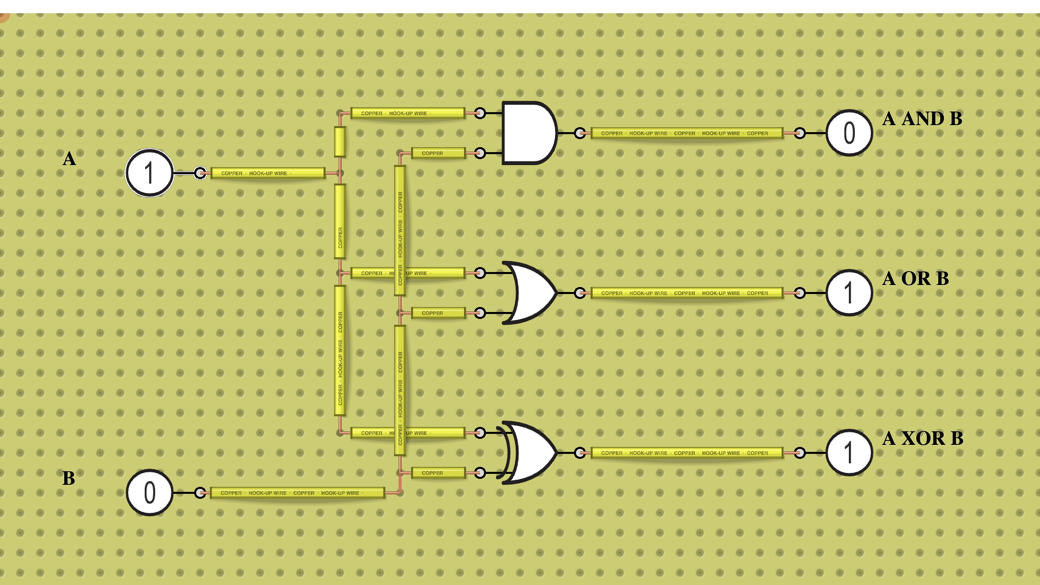
Try it: AND, OR and XOR
Click input A or B to switch it between 0 and 1. You can toggle the inputs here but not add parts.
How to build and test a logic circuit
A circuit with two inputs takes a free account on a computer or tablet; on a phone it works without one.
- Open the lab to start a new circuit.
- Place logic inputs, gates and a logic output for each gate.
- Drag wires from the inputs to the gates, and from each gate to its output.
- Press Play, then click the inputs. The outputs show 1 or 0.
- Try every combination of inputs and compare the outputs with what you expected.
Reading a truth table from the circuit
A truth table lists every combination of inputs and the output for each. The lab does not draw it for you: set each of the four combinations and write down the outputs:
| A | B | A AND B | A OR B | A XOR B |
|---|---|---|---|---|
| 0 | 0 | 0 | 0 | 0 |
| 0 | 1 | 0 | 1 | 1 |
| 1 | 0 | 0 | 1 | 1 |
| 1 | 1 | 1 | 1 | 0 |
Worked example: a half adder
A half adder adds two one-bit numbers, A and B, and gives a sum bit and a carry bit. In the table, the XOR column is the sum: 0 + 1 and 1 + 0 give 1. The AND column is the carry: only 1 + 1 carries, giving binary 10, which is 2. So a circuit with these two gates is a half adder: read XOR as the sum and AND as the carry.
For teachers and classes
Digital electronics teachers can create a classroom, share its join link, assign a logic circuit with a due date and grade what students hand in. Schools can run their classes under an institutional license.
Flip-flops and sequential logic
The lab has no flip-flop part, clock or counter. Our blog explains them:
Frequently asked questions
Is the logic gate simulator free?
Circuits embedded on DCACLab pages run free, with no account. The full lab is free to try, with limits: without an account, on a computer or tablet, you get one of each part and cannot change settings. A free account gives you about 10 minutes before those limits apply. On a phone there is no limit. Saving a circuit needs a plan.
Do I need to download anything?
No. The lab opens in your web browser, so there is nothing to install. There is no app in the app stores.
Does it make truth tables for me?
No. The outputs show 0 or 1 as you click the inputs, so you build the truth table yourself, as above. It does not draw timing diagrams either.
Does it have flip-flops?
No. The lab has no flip-flop part, clock or counter. Our blog explains the SR, D, JK and T flip-flops.
Can I use logic chips?
The gates are single parts you place one by one. The lab also has some ready-made chips, such as the 555 timer, but you cannot turn your own gates into a new chip.
Ready to build your first logic circuit?
Place two logic inputs and an AND gate, and wire the gate to a logic output.